CUA-Suite: Massive Human-annotated Video Demonstrations for Computer-Use Agents
Paper: arXiv:2603.24440 Code: ServiceNow/GroundCUA/VideoCUA Code reference:
main@94cba616(2026-03-24)
1. Motivation (研究动机)
当前 Computer-Use Agents 的核心瓶颈不是缺少强 VLM,而是缺少能同时覆盖 桌面专业软件、连续视频、精确 UI grounding、动作轨迹和推理监督 的高质量数据。已有数据常见三类缺口:一是 Web/Mobile 数据多,专业 desktop 软件少;二是 screenshot-action pair 多,连续 30 fps 视频和鼠标运动动力学少;三是只给最终点击坐标或 accessibility tree,缺少人类验证的 bounding box、元素语义、任务级轨迹和 step-level reasoning。
论文要解决的具体问题是:为 desktop CUA 建一个可训练、可评测、可迁移到未来范式的全栈数据生态。它不是只发布一个 benchmark,而是把三个互补资源统一到同一个数据引擎下:VideoCUA 提供约 10K 个任务、87 个应用、55 小时、6M 帧的连续人类演示;GroundCUA 提供 56K 张 screenshot 和 3.6M+ UI element annotations;UI-Vision 提供 450 条 demonstrations 与 8.2K+ queries,用于诊断 grounding、layout understanding 和 action prediction。
这个问题值得研究,是因为桌面软件的界面比网页更异质:Blender、Krita、FreeCAD、QGIS、OBS 等应用有密集 toolbar、canvas、自绘控件、多 panel layout,模型很容易“知道要做什么”但点错目标。若只有稀疏截图,模型看不到动作之间的 hover、cursor deceleration、drag path、menu opening 等 temporal feedback;而这些信号恰好是 imitation learning、offline RL、GUI world model、video reward model 所需要的因果数据。
2. Idea (核心思想)
核心 insight:把 computer-use 数据从“离散 screenshot + final coordinate”提升为“连续视频 + 同步 action log + dense UI annotation + step-level reasoning”的 superset。这样同一份数据既能退化成现有 action-prediction 格式,也能支持未来的 continuous control、world model、reward model,而不需要重新采集。
关键创新是 CUA-Suite 的统一数据底座:先记录人类专家在 87 个专业 desktop 应用中的完整 30 fps 操作,再从同一条轨迹派生出 VideoCUA、GroundCUA 和 UI-Vision。它与 Mind2Web、AITW、OpenCUA、ScaleCUA 的根本差异在于:这些数据集通常只覆盖 Web/Mobile 或稀疏 screenshot,CUA-Suite 同时提供 desktop coverage、continuous video、human-curated trajectories、long CoT-style annotations 与 pixel-level grounding。
与 OpenCUA 相比,CUA-Suite 不只是扩大任务数,而是补上了连续视频和专业 desktop domain;与 ScaleCUA 相比,它的任务数量较少但提供 55 小时连续视频、约 6M 帧和多层 reasoning annotation,论文强调这比 2M screenshot 更接近 agent 真实执行时看到的信号。
3. Method (方法)
3.1 Overall framework:三层资源共享同一个人类行为数据引擎
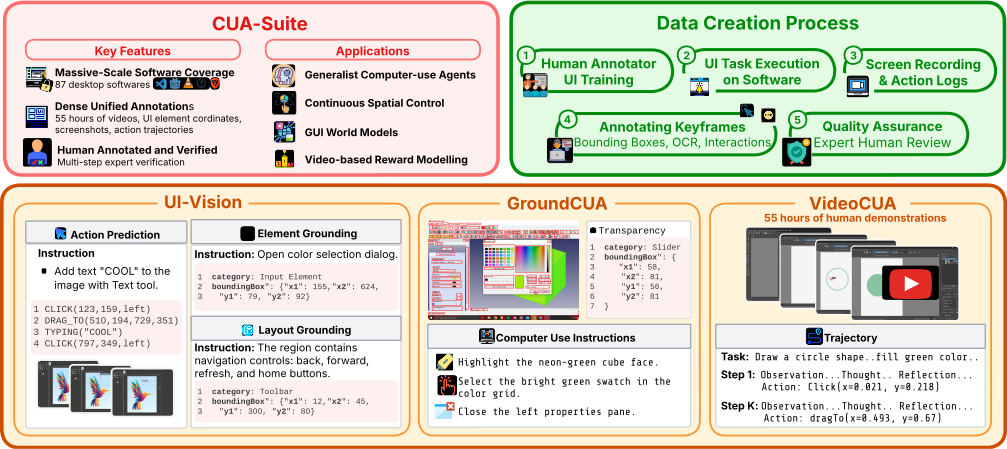
Figure 1 解读:图中左侧概括 CUA-Suite 的关键特征:87 个 desktop software、55 小时视频、UI element coordinates、screenshots、action trajectories,以及 human annotated/verified 的多步监督。右侧显示数据创建流程:人类 annotator 接受 UI training 后执行任务,系统录制 screen recording,并在关键帧上标注 bounding boxes、OCR、interactions。下方的三块对应最终产物:UI-Vision 用于 element grounding、layout grounding、action prediction;GroundCUA 用于 dense UI annotations;VideoCUA 用于 55 小时 human demonstrations 和 trajectory 训练。
直觉上,CUA-Suite 把“屏幕状态、动作、动作后状态、目标意图、元素位置”放在同一时间轴上。这样做的优势是:任何稀疏任务格式都可以从连续视频中导出,但反过来不成立;如果原始数据只保存 final screenshot 和 click coordinate,就无法恢复 cursor path、hover feedback、menu transition 或 step-level reflection。
3.2 数据采集:从应用选择到 dense annotation
选择 87 个专业 desktop applications
论文选择 87 个 open-source applications,覆盖 12 类场景:Education、Browsers、Development、Productivity、Graphics and Design、Video and Audio Production、Communication、Entertainment、System Utilities、Security、Finance and Business Analytics、Scientific。选择 open-source 软件的原因不是降低难度,而是便于公开发布;作者指出 LibreOffice 与 Microsoft Office、开源 IDE 与商业 IDE 等在 UI 元素和 layout 上具有可迁移性。
Expert-driven task design
任务不是模板生成或随机探索,而是由 human experts 设计真实工作流:从 rename folder、create document 到 edit spreadsheet、run simulation、apply subtitles to a video。总计超过 10,000 个 task demonstrations。这个设计避免了自动生成任务中常见的噪声:任务可能语义不完整、动作顺序不自然,或只覆盖 benchmark 容易采样的浅层操作。
High-fidelity recording
Annotators 执行任务时,系统以 30 fps 录制连续屏幕视频,合计约 55 小时、6M frames;同时以 millisecond precision 记录 mouse click、drag、scroll、keystroke,并保存同步的 kinematic cursor traces。这个设置使数据不仅有离散动作,还保留了动作之间的动态过程,例如鼠标接近目标时的减速、菜单打开后的视觉反馈、drag path 的中间状态。
Dense UI annotation 与质量控制
从连续视频中抽取 state-changing action 之前的 keyframes 作为 grounding 标注对象。Annotators 手工给所有可见 UI 元素画 bounding box,并为每个元素提供 textual label;短文本直接记录显示内容,长文本如 code block 或长说明则给 concise summary,并用 PaddleOCR 补充 raw text。约 50% 元素还被分到 8 类 high-level functional categories:Input Element、Sidebar、Information Display、Button、Navigation、Visual Elements、Menu、Others。Appendix A.2 说明 annotation vendor 团队约 70 人,分为 annotators、QA specialists、project managers,多阶段 review、author cross-check 与 custom evaluation scripts 用于保证质量。
3.3 VideoCUA:连续视频轨迹与多层 reasoning annotation
VideoCUA 的基础数据是约 10K 个任务、87 个应用、55 小时连续 30 fps 视频、6M frames。与只存最终点击坐标的数据不同,VideoCUA 可以导出完整的 state-action trajectory。论文把每个 step 表示为:
其中 是当前 screenshot 或视频状态, 是 observation, 是 reasoning chain, 是自然语言 action description, 是可执行的 pyautogui code, 是动作后的状态, 是 reflection。论文采用 OpenCUA 的 multi-layered reasoning trajectory synthesis pipeline,并用 Claude-Sonnet-4.5 为每个 keyframe 生成四类 annotation:observation、thought、action description、reflection。平均每步 496.7 words,其中 observation 157.4、reasoning 194.3、action description 17.7、reflection 127.4。
这部分最重要的设计点是:raw action log 只能告诉模型“点了哪里”,但不知道“为什么点、目标元素是什么、上一步是否正确”。多层 reasoning annotation 把低层坐标动作转成可监督的 agent decision process,使数据既可用于 action prediction,也可用于训练模型生成中间推理或 self-correction 信号。
3.4 UI-Vision:把失败拆成看见、理解、计划三类能力
UI-Vision 是 CUA-Suite 的主要 evaluation benchmark,包含 450 条 high-quality task demonstrations 和 8.2K+ queries。它不是只测最终任务成功率,而是把 agent 能力拆成三类:
- Element Grounding:给文本 query,如 “Click the Save button”,要求定位具体 UI element。
- Layout Grounding:给区域级 query,如 “Select the navigation bar”,要求理解 functionally related elements 的结构。
- Action Prediction:给 high-level goal 和当前 screen state,要求预测下一步 click、drag、type 等动作。
这种拆解能诊断模型到底是视觉定位失败、layout 理解失败,还是 planning 失败。论文引用 UI-Vision 结果指出 visual grounding 是主要 bottleneck;这也是后续 GroundCUA/GroundNext 的设计动机。
3.5 GroundCUA / GroundNext:从 dense grounding annotation 到 grounding model
GroundCUA 是由 CUA-Suite dense UI annotations 派生的 grounding training corpus:56K annotated screenshots、3.6M+ element annotations,覆盖小图标、自绘控件、canvas widget 等 DOM-based 方法容易漏掉的元素;其中约 50% 元素有 fine-grained semantic type。它进一步构造出 700K instruction-tuning dataset,用于训练 GroundNext 3B/7B models。论文描述 GroundNext 使用 two-stage recipe:SFT 后接 RL,并在多个 grounding datasets 上达到 SOTA;GroundNext-3B 与 o3 planner 结合时在 OS-World Verified 上达到 50.6。
3.6 Action prediction evaluation:避免 cursor leakage 的轨迹预处理
自动评测只覆盖 coordinate-based actions,因为 keyboard shortcut、text entry 的正确性依赖应用状态,不容易用像素距离自动判断。输入设置更接近真实部署:模型得到整体 task instruction、最后 个 ground-truth actions 的 history(自然语言 + pyautogui code)以及当前 keyframe screenshot,然后预测下一步动作;模型没有 step-level instruction。
关键预处理来自 Appendix B.1:若动作 的时间戳为 ,keyframe 取相邻动作时间戳的中点:
这样可以避免 screenshot 中 cursor 已经停在 ground-truth target 上导致 information leakage。对于常见的 moveTo -> click pair,moveTo 只是准备动作,不作为评测或 history;如果 click 紧跟 moveTo,则使用 moveTo step 的 keyframe,而不是 click step 的 keyframe,因为后者可能已经泄露目标位置。
3.7 Released code:实现侧重点与可复现实验锚点
Code reference:
main@94cba616(2026-03-24) — pseudocode and mapping based on this commit
| Paper Concept | Source File | Key Class/Function |
|---|---|---|
| VideoCUA download / extraction | VideoCUA/download_data.sh | downloads ServiceNow/VideoCUA from HuggingFace, extracts platform ZIPs |
| End-to-end VideoCUA pipeline | VideoCUA/run_pipeline.sh | chains download, conversion, CoT generation, CoT task-list export |
| Raw action log to trace format | VideoCUA/convert_videocua.py | extract_frames_from_video, action_to_code, convert_task, main |
| CoT generation | VideoCUA/gen_cot.py | generate_cot, process_traj, gen_inner_monologue_mt, generate_traj_eval |
| Prompt / parser for annotation layers | VideoCUA/module/generator.py | GeneratorResponse, parse_generator_response, prompt templates |
| Trajectory evaluation prompt | VideoCUA/module/evaluator.py | JSON fields task_completed, alignment_score, efficiency_score, task_difficulty |
| Reflection generation | VideoCUA/module/reflector.py, reflector_with_prior_judge.py | reflection prompts comparing pre/post screenshots |
| GroundNext inference utilities | groundcua/__init__.py, root README.md | prepare_image, create_messages, set_generation_config, parse_response |
| GroundNext SFT config | training/sft/config/sft/groundnext-3b.json, groundnext-7b.json | Qwen2.5-VL base model, full finetuning, LR/batch/epoch config |
| GroundNext RL recipe | training/rl/recipe/groundnext/groundnext-3b.sh, groundnext-7b.sh | verl.trainer.main_ppo, RLOO estimator, GUI reward function |
论文公式与 released code 实现差异:没有发现需要修正结论的 formula-level discrepancy;但 released repo 主要覆盖 VideoCUA 后处理/CoT synthesis、GroundCUA/GroundNext 训练与推理,不包含论文中 annotation vendor 的内部标注平台或完整人工 QA 流程。
Pseudocode 1:VideoCUA raw video/action log 转标准 trace
from pathlib import Path
import cv2, json

def convert_videocua_task(task_dir: Path, out_dir: Path):
    action_log = json.load(open(task_dir / "action_log.json"))
    video_path = task_dir / "video" / "video.mp4"
    frame_dir = out_dir / "processed_images"
    frame_dir.mkdir(parents=True, exist_ok=True)

    cap = cv2.VideoCapture(str(video_path))
    trajectory = []
    for i, step in enumerate(action_log["action_log"]):
        # released code extracts the frame at the action timestamp and writes it as i.png
        timestamp_ms = float(step["timestamp"]) * 1000.0
        cap.set(cv2.CAP_PROP_POS_MSEC, timestamp_ms)
        ok, frame = cap.read()
        if ok:
            image_path = frame_dir / f"{i}.png"
            cv2.imwrite(str(image_path), frame)
        else:
            image_path = None

        code = action_to_pyautogui(step)  # CLICK, DRAG_TO, SCROLL, TYPE, PRESS, HOTKEY, ...
        trajectory.append({
            "index": i,
            "image": str(image_path),
            "value": {"code": code},
        })

    trace = {
        "task_id": str(action_log["task_id"]),
        "instruction": action_log["task_instruction"],
        "traj": trajectory,
    }
    with open(out_dir / "trace.jsonl", "w") as f:
        f.write(json.dumps(trace, ensure_ascii=False) + "\n")
    return trace
Pseudocode 2:为每个轨迹 step 生成 observation / thought / action / reflection
from concurrent.futures import ThreadPoolExecutor
import json

def generate_cot_for_trace(trace, model, suffix="cot_v1", num_threads=4):
    history = []
    cot_steps = []
    for step in trace["traj"]:
        current_image = load_image(step["image"])
        code = step["value"]["code"]
        patch = draw_coords_from_code(current_image, code)

        messages = build_generator_messages(
            goal=trace["instruction"],
            previous_actions=history[-5:],
            current_image=current_image,
            image_patch=patch,
            predicted_code=code,
        )
        response = call_llm(model=model, messages=messages)
        cot = parse_generator_response(response)  # Observation / Thought / Action

        reflection = build_and_call_reflector(
            task=trace["instruction"],
            history_steps=history,
            current_step={**cot, "code": code},
            current_image=current_image,
            next_image=load_next_image_if_available(trace, step),
        )
        cot_steps.append({
            "index": step["index"],
            "image": step["image"],
            "value": {
                "code": code,
                "observation": cot["observation"],
                "thought": cot["thought"],
                "action": cot["action"],
                "reflection": reflection,
            },
        })
        history.append({"thought": cot["thought"], "code": code})

    meta = evaluate_full_trajectory(trace["instruction"], cot_steps)
    return cot_steps, meta
Pseudocode 3:GroundNext grounding inference
import torch
from transformers import Qwen2_5_VLForConditionalGeneration, AutoProcessor, AutoTokenizer
import groundcua

def groundnext_click_point(image, instruction, model_name="ServiceNow/GroundNext-7B-V0"):
    model = Qwen2_5_VLForConditionalGeneration.from_pretrained(
        model_name,
        torch_dtype=torch.bfloat16,
        attn_implementation="flash_attention_2",
        device_map="auto",
        trust_remote_code=True,
    ).eval()
    processor = AutoProcessor.from_pretrained(model_name)
    tokenizer = AutoTokenizer.from_pretrained(model_name, trust_remote_code=True)
    groundcua.set_generation_config(model)

    image, (width, height) = groundcua.prepare_image(image)
    messages = groundcua.create_messages(instruction, image, width, height)
    prompt = tokenizer.apply_chat_template(messages, add_generation_prompt=True, tokenize=False)
    inputs = processor(text=[prompt], images=[image], padding=True, return_tensors="pt")
    generated = model.generate(**inputs.to(model.device), max_new_tokens=groundcua.DEFAULT_MAX_NEW_TOKENS)
    new_tokens = groundcua.trim_ids(generated, inputs.input_ids)
    text = processor.batch_decode(new_tokens, skip_special_tokens=True)[0]
    return groundcua.parse_response(text, width, height)
4. Experimental Setup (实验设置)
4.1 Datasets and scale
- VideoCUA:约 10K human-demonstrated tasks,87 applications,12 categories,55 小时连续 30 fps 视频,约 6M frames,包含 kinematic cursor traces 和 multi-layered reasoning annotations。
- GroundCUA:56K annotated screenshots,3.6M+ UI element annotations,约 50% elements 有 semantic categories;由此构造 700K instruction-tuning data。
- UI-Vision:450 high-quality task demonstrations,8.2K+ queries,评测 Element Grounding、Layout Grounding、Action Prediction。
- Action prediction evaluation subset:从 VideoCUA 采样 256 tasks;过滤后 1,999 coordinate-based predictions,动作包括 click、doubleClick、rightClick、dragTo。
- Human evaluation subset:49 tasks,576 annotated steps;覆盖 coordinate 与 non-coordinate actions。
4.2 Baselines
UI grounding 结果覆盖 MAI-UI-32B/8B、OpenCUA-72B/32B/7B、UI-Venus-Ground-72B/7B、PhiGround-7B(+o3)、GUI-ARP-7B、Qwen3-VL-32B/8B、InfiGUI-G1-7B、HyperClick、UI-TARS-72B/7B 等。Action prediction 重点评估 OpenCUA-7B 和 OpenCUA-32B 两个 publicly available foundation action models。GroundCUA 相关结果中,论文报告 GroundNext-3B 与 o3 planner 结合在 OS-World Verified 上达到 50.6。
4.3 Metrics
- UI-Vision Element Grounding:Basic、Functional、Spatial 三类 query 的 grounding score,以及 Avg.。
- Coordinate action prediction:Mean Pixel Distance、Median Pixel Distance、@20px、@50px;@50px 表示预测坐标距离 ground truth 在 50 像素内的比例。
- Human evaluation:stepwise accuracy;并拆成 action correctness、coordinate-step grounding accuracy、non-coordinate step accuracy。
- Application-level analysis:按应用统计 OpenCUA-32B 的 predictions、mean pixel distance、@50px。
- Error-distance distribution:只统计 >50px 的错误,并按 50–100、100–200、200–300、300–500、>500 px 分桶。
4.4 Training / implementation config from released code
论文没有详细报告 VideoCUA action-model training 的 GPU type/count 或完整 training schedule;released repo 提供的是数据处理、CoT synthesis、GroundNext inference/training recipes。可复现配置应以具体文件为准:
VideoCUA pipeline config
- File:
VideoCUA/run_pipeline.sh - Default HF repo:
ServiceNow/VideoCUA - Default data/output:
./VideoCUA,./videocua_processed - Default CoT model:
anthropic/claude-sonnet-4.5 - Default suffix:
cot_v1 - Parallelism:
num_workers=4for conversion,num_threads=4for LLM calls - Optional flags:
--platforms,--max_num,--base_url,--need_double_check,--skip_download,--skip_convert,--skip_cot
GroundNext SFT config
- Files:
training/sft/config/sft/groundnext-3b.json,training/sft/config/sft/groundnext-7b.json - Base models:
Qwen/Qwen2.5-VL-3B-Instruct,Qwen/Qwen2.5-VL-7B-Instruct - Dataset:
groundcua-sft - Finetuning: full finetuning,vision tower / projector / language model 均不冻结
- Sequence/image limits:
cutoff_len=16384,image_max_pixels=12845056 - Optimizer schedule:
learning_rate=3e-6, cosine scheduler,warmup_ratio=0.05,num_train_epochs=2.0,max_grad_norm=1.0 - Batching:
per_device_train_batch_size=1,gradient_accumulation_steps=16 - Systems: DeepSpeed ZeRO-2 bf16 config,
bf16=true, FlashAttention 2, gradient checkpointing
GroundNext RL recipe
- Files:
training/rl/recipe/groundnext/groundnext-3b.sh,groundnext-7b.sh - Trainer:
verl.trainer.main_ppo - Estimator:
algorithm.adv_estimator=rloo - Batching:
data.train_batch_size=64,ppo_mini_batch_size=64,ppo_micro_batch_size_per_gpu=1 - Prompt/response length:
max_prompt_length=10000,max_response_length=64 - Reward: custom
gui_reward_function - Actor LR:
1e-6;clip_ratio_high=0.4;use_kl_loss=Falsein the shown recipe
5. Experimental Results (实验结果)
5.1 UI-Vision element grounding:best Avg. 仍不到 50
Table 1 中 MAI-UI-32B 最高,Avg. 为 47.7;MAI-UI-8B 为 41.3;OpenCUA-72B 为 37.3;OpenCUA-32B 为 33.3;OpenCUA-7B 为 29.7。Spatial query 明显更难:MAI-UI-32B 的 Spatial 为 26.9,UI-TARS-7B 只有 8.4,Qwen3-VL-8B 只有 1.2。这个结果支持论文判断:当前模型不只是 task planning 不稳,底层 UI grounding 本身就很弱。
| Model | Basic | Functional | Spatial | Avg. |
|---|---|---|---|---|
| MAI-UI-32B | 59.1 | 57.1 | 26.9 | 47.7 |
| MAI-UI-8B | 51.7 | 49.6 | 22.5 | 41.3 |
| OpenCUA-72B | – | – | – | 37.3 |
| UI-Venus-Ground-72B | 45.6 | 42.3 | 23.7 | 37.2 |
| PhiGround-7B + o3 | 44.2 | 43.8 | 20.5 | 36.2 |
| OpenCUA-32B | – | – | – | 33.3 |
| OpenCUA-7B | – | – | – | 29.7 |
| UI-TARS-7B | 20.1 | 24.3 | 8.4 | 17.6 |
5.2 Dataset comparison:VideoCUA 的差异是 continuous desktop video + long CoT
论文 Table 2 的关键对比是:Mind2Web、AgentTrek 偏 Web;AITW、GUI-Odyssey 偏 Mobile;OmniACT、OSWorld、OpenCUA 覆盖 desktop 或 cross-platform,但没有连续视频;ScaleCUA 规模大但约 2M screenshots 而非 released continuous video。VideoCUA 以约 10K tasks、87 envs、55h / 6M frames 的形式同时满足 Video、Desktop、Human、long CoT。
| Dataset | Platform | Tasks | Envs | Video | Desktop | Human | CoT | Scale |
|---|---|---|---|---|---|---|---|---|
| Mind2Web | Web | 2,350 | 137 | ✗ | ✗ | ✓ | ✗ | ~17K SS |
| AgentTrek | Web | 10,398 | 127 | ✗ | ✗ | ✗ | short | ~126K SS |
| AITW | Mobile | 715K | 357 | ✗ | ✗ | Mix. | ✗ | ~4.6M SS |
| OpenCUA | Desktop | 22,625 | 140+ | ✗ | ✓ | ✓ | long | ~421K SS |
| ScaleCUA | Cross | ~19K | – | ✗ | ✓ | Mix. | ✗ | ~2M SS |
| VideoCUA | Desktop | ~10K | 87 | ✓ | ✓ | ✓ | long | 55h / 6M fr. |
5.3 Action prediction:32B 比 7B 强很多,但绝对成功率仍低
OpenCUA-32B 在 1,999 个 coordinate predictions 上达到 37.7% @50px,OpenCUA-7B 只有 16.5%;mean pixel distance 从 387.5 降到 274.2,median 从 236.0 降到 97.0。Scaling 有帮助,但 37.7% @50px 意味着约 60% 以上坐标动作仍不够接近目标。
| Model | Preds | Mean Px↓ | Med. Px↓ | @20px↑ | @50px↑ |
|---|---|---|---|---|---|
| OpenCUA-7B | 1,946 | 387.5 | 236.0 | 7.9% | 16.5% |
| OpenCUA-32B | 1,999 | 274.2 | 97.0 | 22.0% | 37.7% |
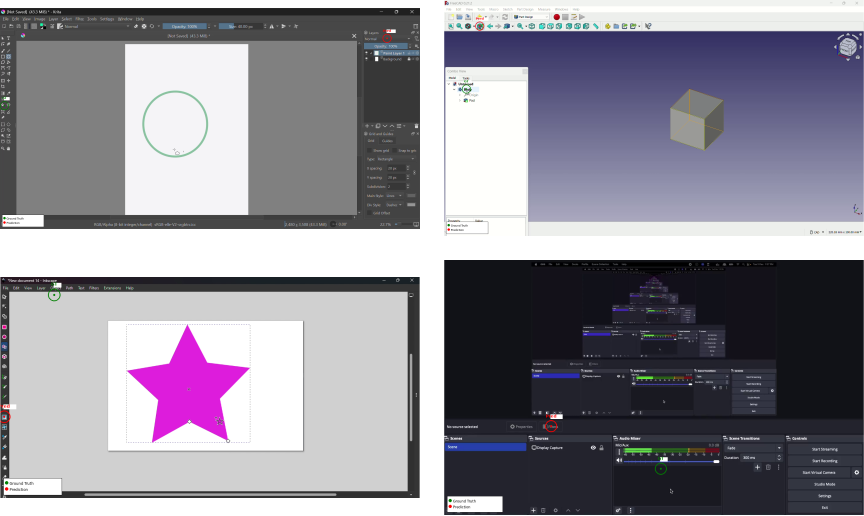
Figure 2 解读:四个例子分别展示 Krita、FreeCAD、Inkscape、OBS Studio 中的 desktop-specific failure。绿色圆圈是 ground truth,红色圆圈是模型预测。Krita 中模型跨 panel 点到右侧 Layers panel;FreeCAD 中把目标 tree node 与 toolbar icon 混淆;Inkscape 中错把 menu bar target 当成 sidebar tool;OBS Studio 则在多 panel layout 中选错区域。共同问题是:模型常能形成大致动作意图,但在密集、非标准、canvas-heavy 的专业软件界面里无法精确 grounding。
5.4 Human evaluation:动作类型常对,grounding 常错
对 OpenCUA-32B 的 49 tasks / 576 steps 人工评测显示 combined stepwise accuracy 为 57.6% (332/576)。拆开后,action correctness 是 85.9% (495/576),coordinate-based steps 的 grounding accuracy 只有 52.4% (195/372),non-coordinate steps 为 67.6% (138/204)。这说明模型经常知道“要 click / drag / type 什么类型的动作”,但不知道“具体点哪个 UI element”。
5.5 Application-level variance:专业 creative/canvas 软件最难
OpenCUA-32B 的 per-application @50px 从 3.6% 到 73.3% 波动。最差应用包括 Darktable 3.6%、OnlyOffice Forms 11.8%、Krita 12.9%、Kodi 14.6%;相对较好的是 OnlyOffice Spreadsheet 73.3%、IntelliJ IDEA 66.7%、LibreOffice Calc 66.7%、VLC 66.7%。作者解释为:web-like 或标准 toolbar hierarchy 与模型训练分布更接近,而 creative/canvas/professional tools 的 iconography 和 panel structure 更复杂。
| Group | Application | Domain | Preds | Mean Px | @50px |
|---|---|---|---|---|---|
| Lowest | Darktable | Photo Editing | 28 | 259.0 | 3.6% |
| Lowest | OnlyOffice Forms | Forms | 17 | 232.6 | 11.8% |
| Lowest | Krita | Digital Art | 31 | 417.8 | 12.9% |
| Lowest | Kodi | Media Center | 41 | 591.9 | 14.6% |
| Lowest | GnuCash | Accounting | 52 | 359.2 | 21.2% |
| Highest | OnlyOffice Spreadsheet | Spreadsheet | 15 | 123.9 | 73.3% |
| Highest | IntelliJ IDEA | IDE | 21 | 127.0 | 66.7% |
| Highest | LibreOffice Calc | Spreadsheet | 24 | 223.4 | 66.7% |
| Highest | VLC Media Player | Media Player | 21 | 80.2 | 66.7% |
| Highest | DuckDuckGo | Web Browser | 14 | 100.1 | 64.3% |
5.6 Error distance:错误不是轻微偏移,约三分之一超过 500 px
在超过 50 px 的错误中,OpenCUA-32B 有 31.0% 超过 500 px,OpenCUA-7B 有 33.1% 超过 500 px。32B 的 50–100 px 桶占 20.2%,高于 7B 的 13.7%,说明 scaling 会把部分错误向目标附近移动,但还没有根治远距离错 panel / 错区域问题。Appendix B.3 还指出 256 个评测任务中有 128 个同时包含 within-20px 的预测和超过 500px 的预测,说明模型不是“某个任务总是会/不会”,而是在同一任务中对不同 UI element 的 grounding 稳定性很不一致。
| Distance Range | OpenCUA-32B Count | OpenCUA-32B % | OpenCUA-7B Count | OpenCUA-7B % |
|---|---|---|---|---|
| 50–100px | 252 | 20.2% | 222 | 13.7% |
| 100–200px | 252 | 20.2% | 325 | 20.0% |
| 200–300px | 150 | 12.0% | 246 | 15.1% |
| 300–500px | 205 | 16.5% | 294 | 18.1% |
| >500px | 386 | 31.0% | 537 | 33.1% |
| Total (>50px) | 1,245 | — | 1,624 | — |
5.7 结果结论与范围限制
结论是:CUA-Suite 的价值首先是数据底座,而不是一个单一模型的算法改进。它证明了当前 foundation action models 在 professional desktop application 上仍有显著 grounding bottleneck;同时提供了能训练下一代模型的数据形式。论文明确指出 automated evaluation 只覆盖 coordinate-based actions,非坐标动作需要 human evaluation;当前评测也不是 definitive benchmark,而是揭示能力版图。另一个应注意的范围是,VideoCUA 主要覆盖 open-source desktop applications;这有利于公开发布,但真实商业软件、企业内部工具和隐私敏感场景仍需要进一步验证。