Video Panels for Long Video Understanding
Authors: Lars Doorenbos*, Federico Spurio*, Juergen Gall Affiliations: University of Bonn & Lamarr Institute for Machine Learning and Artificial Intelligence Year: 2025 Code: 暂未开源(论文声明 acceptance 后开源)
1. Motivation (研究动机)
1.1 问题背景
当前 Video-Language Models (VLMs) 在长视频理解上表现不佳,核心瓶颈在于 有限的上下文窗口 (context window) 。当视频帧数 时,模型只能均匀采样少量帧,导致 时间分辨率急剧下降,而空间分辨率保持不变。这种不平衡意味着模型将大量计算资源用于空间细节,而非时间关系建模。
例如,Qwen-VL2.5 在处理超过 3 分钟的视频时,准确率出现显著下降。
1.2 核心贡献概览
- 首个面向长视频理解的 visual prompt engineering 方法:无需训练、无需额外参数、模型无关,可即插即用到任意 VLM
- 广泛实验验证:在 5 个 benchmark、7 个 VLM 上一致性提升,TimeScope (Long) 上 VideoLLaMA 3 准确率提升高达 +7.6 (19.4%)
- Fine-tuning 可进一步增强:在原始训练数据上以 panel 格式微调,性能继续提升
2. Idea (核心思想)
用空间换时间:将多帧拼接为一张 panel 图像(类似漫画分格),在不增加输入 token 数的前提下,大幅提升时间覆盖范围。
核心直觉是:短视频不需要 paneling,直接保留原始帧;长视频则通过把多个时间步合并进一张图,在保持 token 预算基本不变的情况下扩大时间感知范围。
3. Method (方法)
3.1 问题形式化
数据集形式为 ,其中:
- 视频 ,时长为 帧
- 问题 (多选题)
- 正确答案
采样函数 从视频中采样 帧。
3.2 动态帧采样 (Dynamic Frame Sampling)
根据上下文窗口 与视频时长 的比值,动态决定采样帧数 :
其中:
- :最小帧间距(fps 阈值),仅当采样帧间距 时才启用 paneling
- :水平拼接帧数
- :垂直拼接帧数
- 默认设置:,即 panel
关键直觉:短视频()不需要 paneling,直接用原始帧;长视频采样 帧,然后每 帧拼成一张 panel 图。
3.3 Panel 构建 (Panel Construction)
当 时,采样得到 ,先下采样为:
然后每 帧按 从左到右、从上到下 顺序拼成一张 panel 图。最终输入:
以 为例,每个 panel 图的构成:
这样在保持输入尺寸不变的前提下,时间覆盖扩大了 倍(默认 4 倍)。
3.4 Fine-tuning
在原始训练数据上以 panel 格式微调,损失函数为标准的多选题负对数似然:
以 LLaVA-OneVision 7B 为例,在 LLaVA-Video-178K 上微调 1 epoch,batch size=2,gradient accumulation=4。
3.5 伪代码
def video_panels(video, C, alpha=2, beta=2, gamma=1.0):
    """
    Video Panels visual prompting for long video understanding.

    Args:
        video: input video, shape [D, 3, H, W]
        C: context window size (max frames VLM can process)
        alpha: horizontal panels per image
        beta: vertical panels per image
        gamma: fps threshold for paneling activation
    Returns:
        panels: panel images, shape [C, 3, H, W]
    """
    D = video.shape[0]

    # Step 1: Dynamic frame sampling
    if gamma * C >= D:
        # Short video: standard sampling, no paneling needed
        T = C
        frames = uniform_sample(video, T)
        return frames  # [C, 3, H, W]
    else:
        # Long video: sample alpha*beta*C frames for paneling
        T = alpha * beta * C
        frames = uniform_sample(video, T)  # [alpha*beta*C, 3, H, W]

    # Step 2: Downsample each frame spatially
    # [alpha*beta*C, 3, H, W] -> [alpha*beta*C, 3, H/alpha, W/beta]
    frames_down = resize(frames, H // alpha, W // beta)

    # Step 3: Construct panel images
    panels = []
    for i in range(C):
        # Stack alpha*beta frames into one panel image
        # Left-to-right, top-to-bottom order
        panel = grid_concat(
            frames_down[i*alpha*beta : (i+1)*alpha*beta],
            rows=alpha, cols=beta
        )  # [3, H, W]
        panels.append(panel)

    return stack(panels)  # [C, 3, H, W]
3.6 代码实现映射
| 论文概念 | 代码映射 |
|---|---|
| 采样函数 | uniform_sample(video, T) — 均匀采样 |
| 动态帧数 (公式 1) | 条件判断 if gamma * C >= D |
| Panel 构建 | resize + grid_concat,从左到右、从上到下拼接 |
| Fine-tuning 损失(公式 2) | 标准多选题交叉熵损失 |
| 评测框架 | lmms-eval |
| 基线 low-res | Average pooling on visual tokens (27x27 → pad to 28x28 → pool) |
4. Experimental Setup (实验设置)
4.1 模型分组
| 分组 | 模型 | 上下文帧数 |
|---|---|---|
| Small-context | Video-LLaVA, VideoChat2-HD | 8-16 |
| Medium-context | LLaVA-OV (0.5B/7B/72B), Qwen-2.5VL, LLaVA-Video (7B/72B) | 32-64 |
| Long-context | Qwen-2VL, Qwen-2.5VL, VideoLLaMA 3 | 180 |
4.2 数据集
| 数据集 | 视频数 | 平均时长 | 特点 |
|---|---|---|---|
| VideoMME | 2,700 | short/medium/long | 综合评测 |
| TimeScope | Short 2590 / Long 450 | 最长 10 小时 | Needle-in-a-haystack |
| MLVU | 2,593 QA | 15 分钟 | 3min-2hr |
| MF2 | 850 claim-pairs | 88.3 分钟 | 完整电影 |
| VNBench | 5,400 | 10-180 秒 | 时序/顺序 |
4.3 超参数
默认设置为 ,,采用均匀采样。
5. Experimental Results (实验结果)
5.1 主实验结果
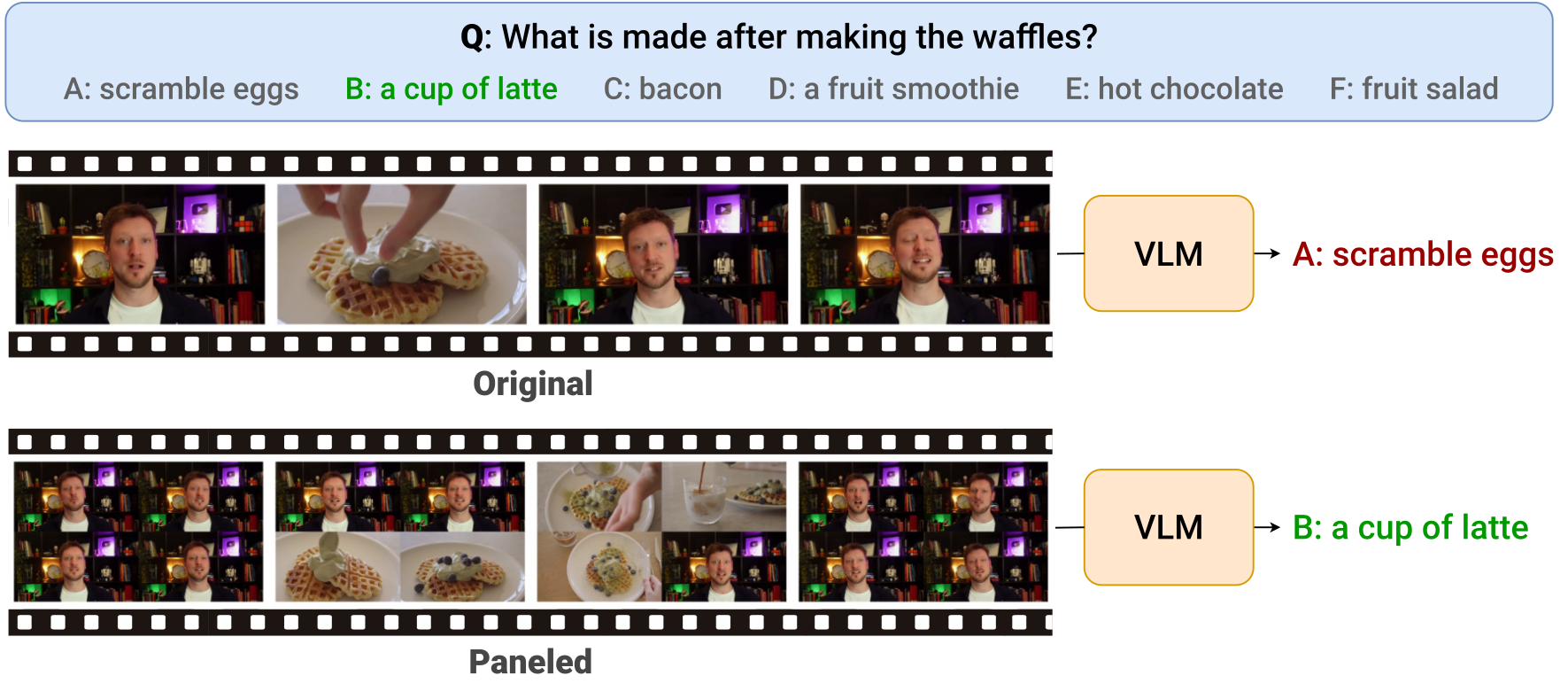
Figure 1 解读:Figure 1 展示了 Video Panels 方法的核心思想。上半部分为原始输入方式:LLaVA-OneVision 7B 对 VideoMME 样本仅看到有限帧,无法回答”做完华夫饼后做了什么”,错误选择”煎鸡蛋”。下半部分使用 panel 方式:将多帧拼成 网格图,同样的上下文窗口下能看到 4 倍的帧数,成功捕捉到”制作拿铁”的关键信息,回答正确。这直观展示了空间换时间的有效性。
关键数值:
| 模型 | 基线平均 | +Panels 平均 | 提升 |
|---|---|---|---|
| Video-LLaVA 7B (8帧) | 33.8 | 34.8 | +1.0 |
| LLaVA-OV 7B (32帧) | 52.8 | 56.2 | +3.4 |
| LLaVA-OV 72B (32帧) | 49.4 | 52.5 | +3.1 |
| Qwen-2.5VL (32帧) | 51.9 | 55.3 | +3.4 |
| LLaVA-Video 7B (64帧) | 56.6 | 60.7 | +4.1 |
| LLaVA-Video 72B (64帧) | 55.4 | 58.2 | +2.8 |
| VideoLLaMA 3 7B (180帧) | 58.2 | 60.9 | +2.7 |
最大亮点:VideoLLaMA 3 7B 在 TimeScope (Long) 上从 39.1 提升到 46.7,提升 +7.6 (19.4%)。
5.2 Fine-tuning 结果
| 设置 | VMME overall | TimeScope Short | TimeScope Long |
|---|---|---|---|
| No FT, No Panels | 58.5 | 58.7 | 30.2 |
| FT (Proj+LLM), No Panels | 58.5 | 58.0 | 30.9 |
| No FT, With Panels | 58.9 | 69.5 | 33.8 |
| FT (Proj+LLM), With Panels | 59.3 | 69.5 | 34.4 |
Fine-tuning 在 panel 格式上额外提升 VMME +0.4、TimeScope Long +0.6。
5.3 对比 Token Reduction 基线
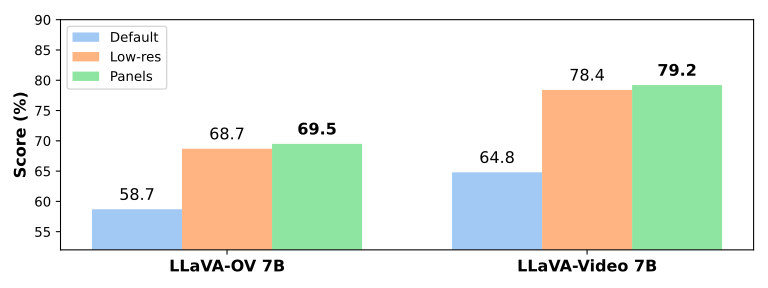
Figure 2 解读:在 TimeScope 上对比三种策略——default(不压缩)、low-res(average pooling 降低 token 数)、panels(本文方法)。对于 LLaVA-OneVision 7B,default 得分 58.7,low-res 得分 68.7,panels 得分 69.5。对于 LLaVA-Video 7B,default 得分 64.8,low-res 得分 78.4,panels 得分 79.2。Panels 在两个模型上均优于或持平 low-res,且 panels 是在输入端操作,更加通用。这说明将多帧合成 panel 是比简单降 token 更优的时间-空间平衡策略。
5.4 不同视频时长的性能
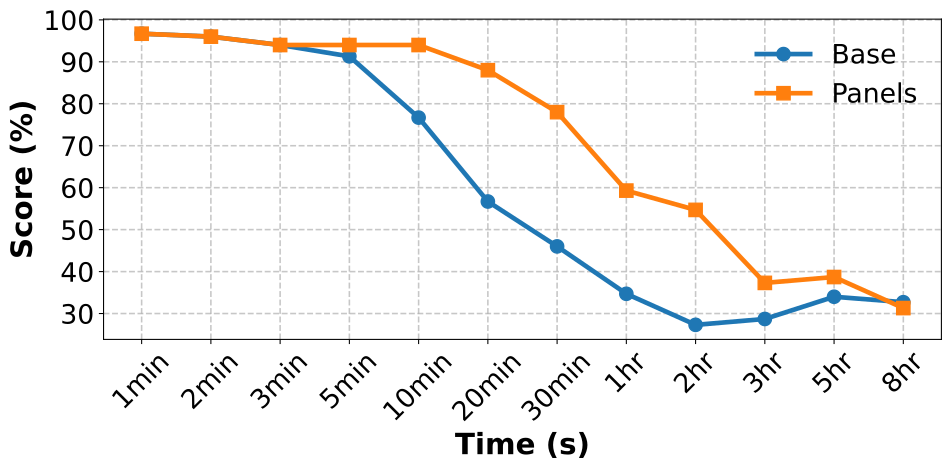
Figure 3a 解读:展示 LLaVA-Video 7B 在 TimeScope 上随视频时长变化的准确率曲线。蓝线(Base)随时长增加从约 90% 降至约 30%,橙线(Panels)在所有时长上均高于基线,特别是在 10 分钟以上的长视频段,优势更为显著。这验证了 paneling 对长视频的提升效果随视频变长而更加明显。
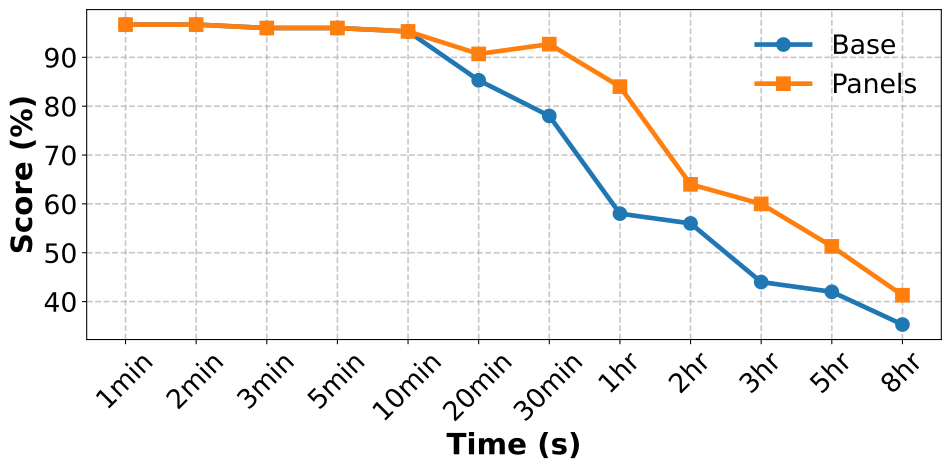
Figure 3b 解读:展示 VideoLLaMA 7B 在 TimeScope 上的类似趋势。即使是拥有 180 帧上下文窗口的长上下文模型,panels 依然能带来一致的性能提升,在超长视频(3hr+)上提升尤为显著。
5.5 上下文窗口大小的影响
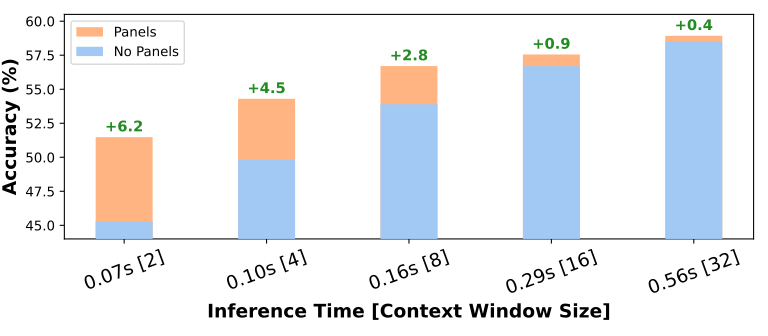
Figure 4a 解读:LLaVA-OneVision 7B 在不同上下文窗口大小(2-32帧)下的表现。蓝色柱状图(Panels)在所有窗口大小下均优于红色柱状图(No Panels),且 窗口越小,提升越大(2帧时提升 +6.2,4帧时 +6.5)。值得注意的是,使用 panels 的 8 帧模型达到了与不使用 panels 的 16 帧模型相当的性能,意味着 可以用一半的 token 达到相同效果。
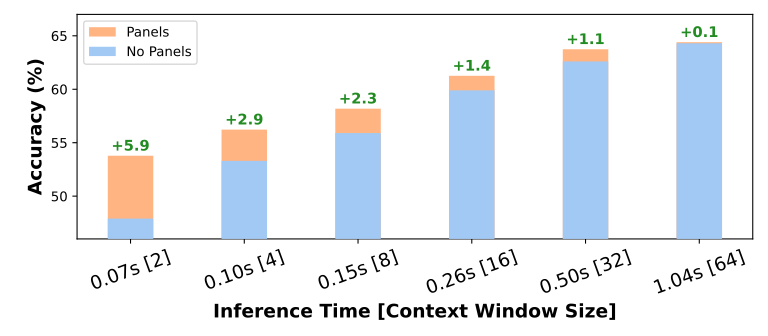
Figure 4b 解读:LLaVA-Video 7B 呈现类似趋势。在 2 帧时提升 +3.9,在 32 帧和 64 帧时提升分别为 +1.1 和 +0.1。随着上下文窗口增大,paneling 的边际收益递减,但始终为正。
5.6 定性分析
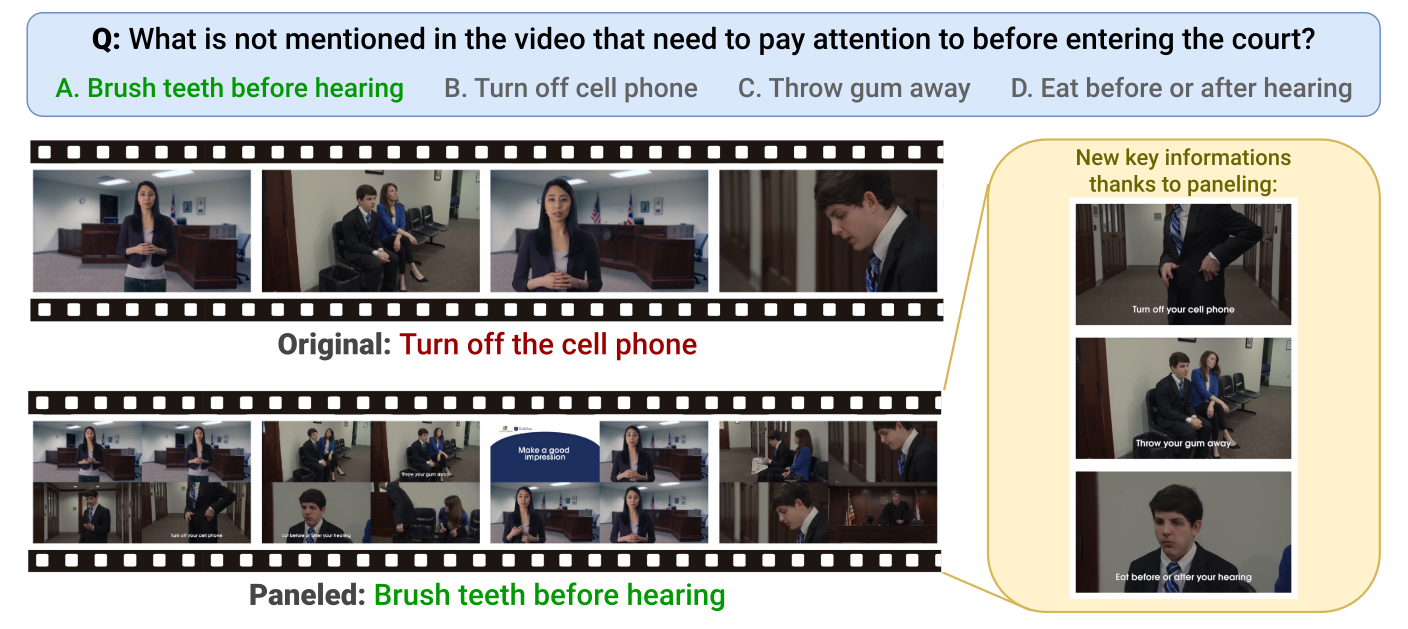
Figure 5 解读:一个 VideoMME 的具体案例。问题为”视频中没有提到进入法庭前需要注意什么?“正确答案为”A: 听证前刷牙”。原始方式下 LLaVA-OV 7B 回答错误(“关掉手机”),因为有限帧中看不到关键信息。使用 panels 后,模型能在拼接图中看到”关掉手机”、“吐掉口香糖”、“听证前吃饭”等文字提示(右侧放大区域标注),从而正确排除这些选项,选出”刷牙”。这说明 paneling 不仅增加了时间覆盖,还能让模型识别画面中的文字细节。
5.7 消融实验
的影响 (Table 3):
| VMME overall | TimeScope Short | TimeScope Long | |
|---|---|---|---|
| 0 | 58.8 | 70.5 | 33.8 |
| fps | 58.9 | 70.2 | 33.8 |
| fps (default) | 58.9 | 69.5 | 33.8 |
| fps | 58.9 | 69.2 | 33.8 |
短视频不 panel 效果更好,但 对长视频影响不大。
的影响 (Table 4):
| 配置 | VMME overall | TimeScope Short | TimeScope Long |
|---|---|---|---|
| (无 panel) | 58.5 | 58.7 | 30.2 |
| 58.6 | 65.9 | 31.3 | |
| 48.1 | 63.5 | 32.7 | |
| (default) | 58.9 | 69.5 | 33.8 |
| 58.4 | 76.5 | 33.8 | |
| 58.4 | 73.9 | 30.9 |
是最佳平衡点。 效果差(不对称 panel 效果不好)。 在 TimeScope Short 上更好,但总体 最优。
Prompt 的影响 (Table 5):
| 模型 | No prompt | Prompt 1 | Prompt 2 | Prompt 3 |
|---|---|---|---|---|
| LLaVA-OV 7B | 58.9 | 60.1 | 59.4 | 58.8 |
| Qwen2.5-VL | 62.4 | 61.9 | 61.8 | 62.9 |
不同模型适合不同 prompt,没有统一最优 prompt,但 prompt 可以进一步提升性能。