LiveVLM: Efficient Online Video Understanding via Streaming-Oriented KV Cache and Retrieval
Authors: Zhenyu Ning, Guangda Liu, Qihao Jin, Wenchao Ding, Minyi Guo, Jieru Zhao Affiliations: Shanghai Jiao Tong University, Fudan University Venue: arXiv 2505.15269, May 2025
1. Motivation (研究动机)
1.1 核心问题
当前 Video LLM 主要面向 离线 (offline) 场景设计:用户提问后才处理整个视频。这在流式视频(自动驾驶、机器人、AR)场景中存在三大挑战:
- 视觉信息保留 (Performance):现有方法对 visual features 进行高压缩导致细粒度信息丢失
- 显存开销 (Overhead):长视频的 KV cache 随帧数增长呈 复杂度,极易 OOM
- 实时交互速度 (Speed):离线方法需等待用户提问后重新处理视频,响应延迟大
1.2 现有方法的不足
| 方法类别 | 代表工作 | 局限 |
|---|---|---|
| Sparse sampling / Token merging | VideoLLM-online, LLaVA-OneVision | 高压缩损失细粒度信息 |
| Query-guided 检索 | MovieChat+ | 仅支持单轮对话,不保留长期记忆 |
| KV 预计算 | ReKV | 不压缩完整 KV → 显存溢出后 offload 到 CPU,通信开销大 |
| 可学习模块 | Flash-VStream, Dispider | 需要额外训练,高压缩下性能下降 |
核心 insight:与压缩 visual features 相比,压缩 KV tensors 包含更多冗余信息,可以在更高压缩比下保持性能。
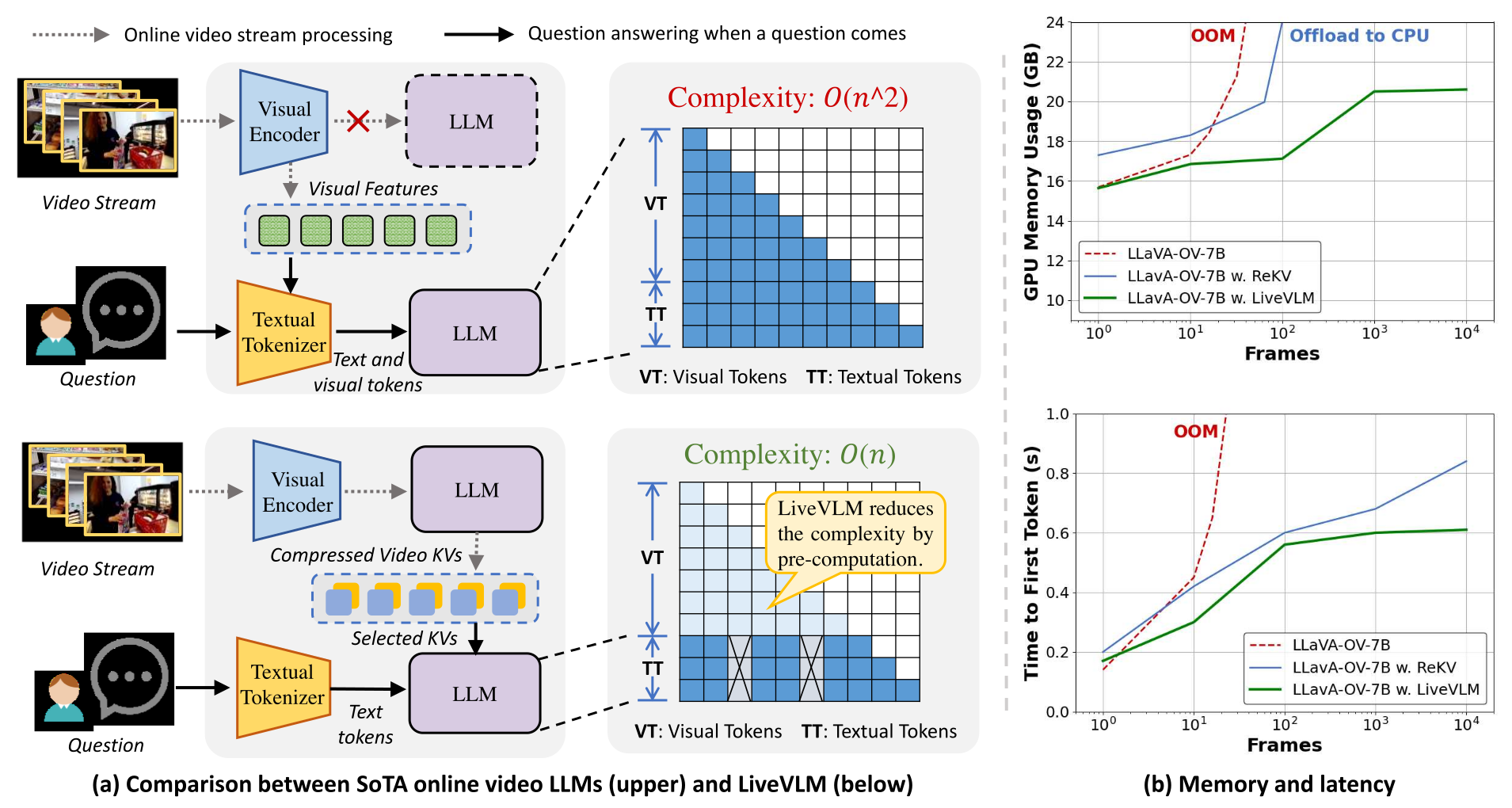
Figure 1 解读:上图 (a) 对比了传统在线 Video LLM 与 LiveVLM 的架构差异。传统方法将所有 visual features 和 text tokens 一起送入 LLM,计算复杂度为 。LiveVLM 在视频流处理阶段就预计算并压缩 KV,问答时只检索相关 KV chunks,复杂度降至约 。图 (b) 展示随帧数增加,ReKV 因 OOM 需 offload 到 CPU 导致延迟急剧上升,而 LiveVLM 保持稳定的显存占用和低延迟。
2. Idea (核心思想)
LiveVLM 是一个 training-free 的流式在线视频理解框架,核心思路:
- Streaming-Oriented KV Cache:视频流处理阶段持续编码并 压缩 video KV,存入长期记忆
- Video-Specific KV Compression:结合 attention-based pruning + frame-wise merging 的两阶段压缩策略,消除 70% 冗余 KV
- Online Question-Answering:问答时从长期记忆中 检索 query-relevant KV chunks,结合短期记忆(滑动窗口),提供给 LLM 生成回答
- Relative Positional Embedding:对选中的 tokens 使用相对位置编码,避免 RoPE 在长视频中对远距离 token 的注意力衰减
关键指标:
- 同设备可处理帧数提升 44x(32 → 1400+ 帧)
- 响应速度提升 5x(对比 256 帧输入的 SoTA 方法)
- 显存降低 2.6x
3. Method (方法)
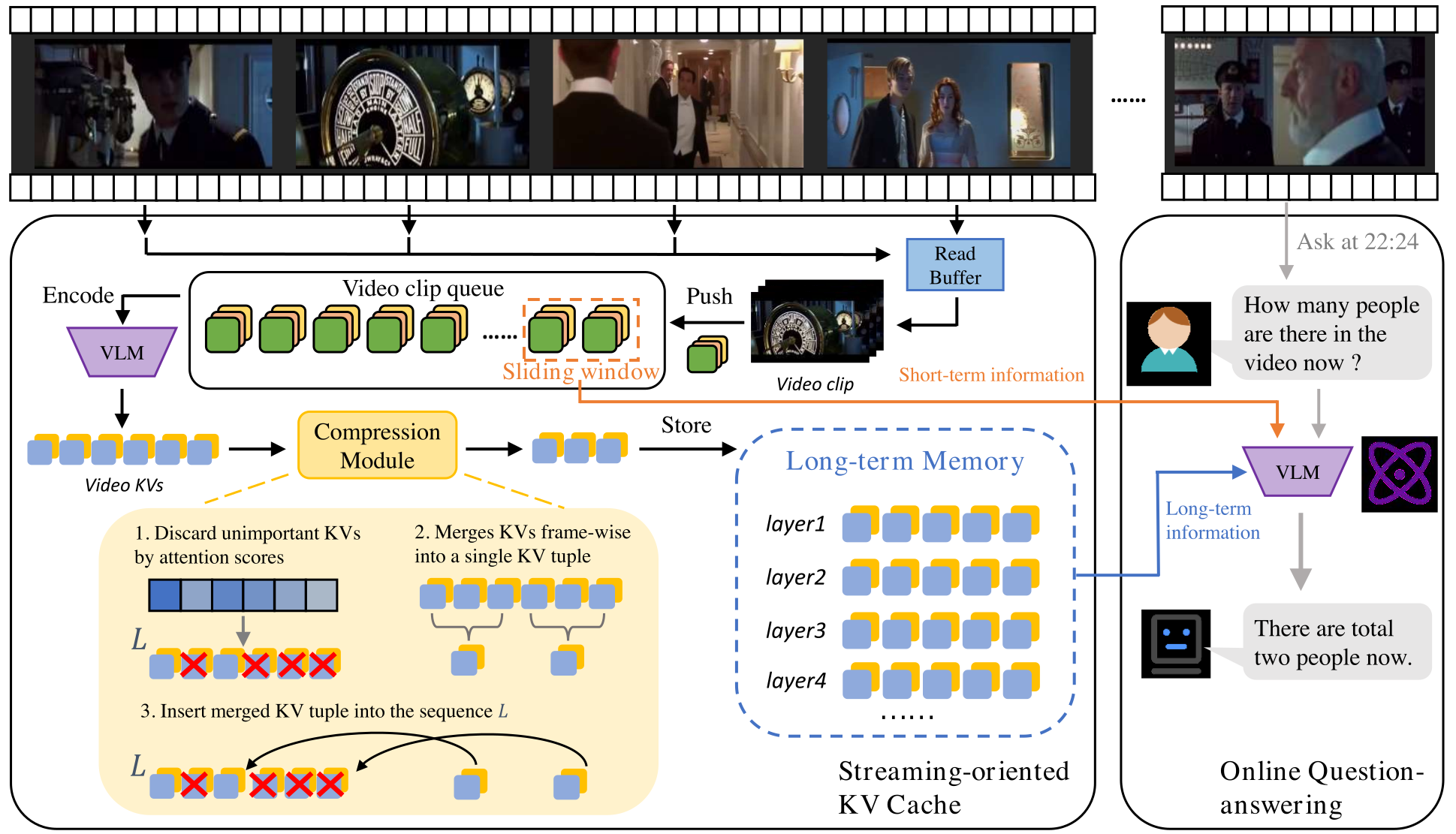
Figure 2 解读:LiveVLM 整体工作流程。左侧展示视频流处理流程:输入帧被分成 video clips → visual encoder 编码 → 生成 video KV → 经过 Compression Module(先 attention-based 剪枝再 frame-wise 合并)→ 压缩后的 KV chunks 存入 Streaming-oriented KV Cache 作为长期记忆。同时最新帧保存在 Read Buffer 作为短期记忆。右侧展示问答流程:用户提问后,从长期记忆检索相关 KV chunks,结合短期记忆送入 VLM 生成回答。
3.1 Streaming Video Encoding
LiveVLM 以 video clip(默认 8 帧)为单位处理视频流。对第 个 clip ,计算注意力时利用之前所有已压缩的 KV:
其中 是 clip 的 QKV 向量, 是注意力输出用于计算下一层的 QKV。 为之前 clips 的压缩 KV。
# Streaming Video Encoding
# Input: video_stream, clip_size=8
# Output: streaming_kv_cache

kv_cache = []  # 长期记忆
short_term_buffer = Queue(maxsize=8)  # 短期记忆,最近 8 帧

for clip_i in split_into_clips(video_stream, clip_size):
    # Step 1: 编码当前 clip
    Q_i, K_i, V_i = visual_encoder(clip_i)

    # 利用之前已压缩的 KV 计算当前 clip 的注意力
    K_prev = concat([chunk.K for chunk in kv_cache])
    V_prev = concat([chunk.V for chunk in kv_cache])
    O_i = Attention(Q_i, concat(K_prev, K_i), concat(V_prev, V_i))

    # Step 2: 压缩当前 clip 的 KV (详见 3.2)
    K_i_c, V_i_c, m_i = compress_kv(Q_i, K_i, V_i)

    # Step 3: 存入长期记忆
    if len(kv_cache) >= max_capacity:
        kv_cache.pop(0)  # FIFO 策略
    kv_cache.append(KVChunk(K=K_i_c, V=V_i_c, mean_key=m_i))

    # 更新短期记忆
    short_term_buffer.push(clip_i)
3.2 Video-Specific KV Compression
压缩包含两个阶段:
Stage 1: Attention-based Token Discarding
由于最新 Video LLM 使用 FlashAttention,注意力分数不会显式计算。LiveVLM 使用最后 个 visual tokens 的 query 向量计算部分注意力分数:
其中 是 chunk 中第 个 token 的 query 向量, 是 visual tokens 数量, 是 个 query tokens 的分数, 是 pooled score。根据 的排名丢弃低分 KV tokens。
计算开销:仅增加不到 1% 的额外计算和显存。
Stage 2: Frame-wise KV Merging
将每帧的剩余 KV 向量合并为 单个 KV tuple(frame-wise representation),插入到压缩序列中对应帧的末尾位置 。
# Video-Specific KV Compression
# Input: Q_i, K_i, V_i (当前 clip 的 QKV), compression_ratio=0.7
# Output: K_i_c, V_i_c, m_i

def compress_kv(Q_i, K_i, V_i):
    N_v = K_i.shape[0]  # visual tokens 总数
    r = last_r_tokens  # 用于计算注意力分数的 query token 数

    # Stage 1: Attention-based pruning
    # 用最后 r 个 query tokens 计算部分注意力
    W_i = softmax(Q_i[N_v-r:N_v] @ K_i.T)  # [r, N_v]
    S_i = mean_pool(W_i, dim=0)             # [N_v]

    # 保留 top (1-ratio) 的 tokens
    keep_count = int(N_v * (1 - compression_ratio))
    top_indices = topk(S_i, keep_count)
    K_pruned = K_i[top_indices]
    V_pruned = V_i[top_indices]

    # Stage 2: Frame-wise merging
    # 对每帧的 KV 做 mean pooling 得到单个 KV tuple
    K_merged, V_merged = [], []
    for frame_idx in range(num_frames):
        frame_mask = get_frame_tokens(top_indices, frame_idx)
        K_merged.append(mean(K_pruned[frame_mask], dim=0))
        V_merged.append(mean(V_pruned[frame_mask], dim=0))

    # 将 merged KV tuple 插入到每帧末尾
    K_i_c = interleave(K_pruned, K_merged)  # 按帧位置插入
    V_i_c = interleave(V_pruned, V_merged)

    # 计算 mean-pooled key 用于后续检索
    m_i = mean(K_i_c, dim=0)

    return K_i_c, V_i_c, m_i
Table 1: Frame-wise merging 的效果(MSVD / TGIF accuracy %)
| 方法 | 压缩比 | MSVD | TGIF |
|---|---|---|---|
| w/o merging | ↓40% | 73.4 | 75.8 |
| w/o merging | ↓60% | 73.6 | 76.8 |
| w/o merging | ↓80% | 75.8 | 77.0 |
| w. merging | ↓40% | 74.6 | 76.6 |
| w. merging | ↓60% | 78.0 | 76.6 |
| w. merging | ↓80% | 76.6 | 77.2 |
3.3 Online Question-Answering
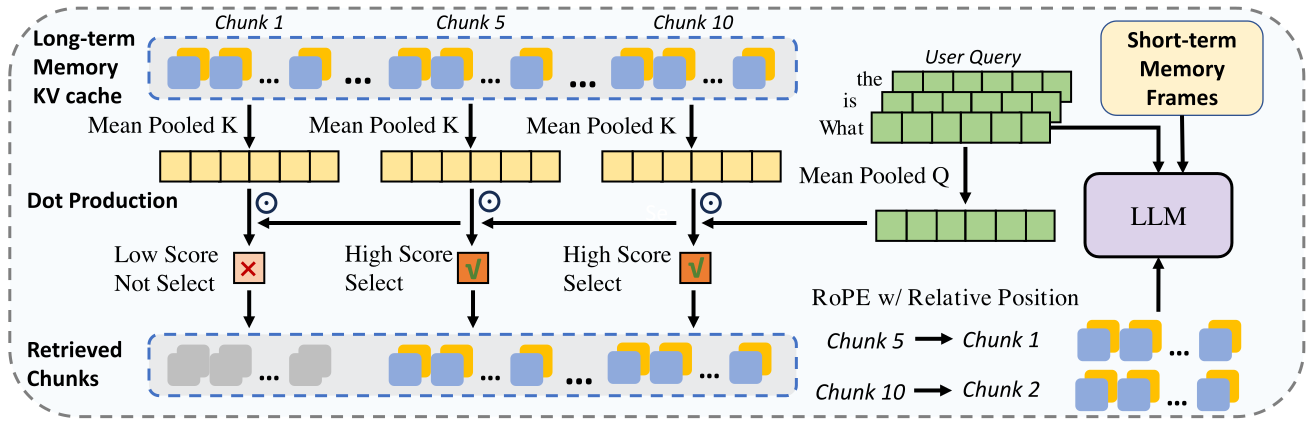
Figure 3 解读:在线问答过程示意图。长期记忆 KV cache 中每个 chunk 都有一个 Mean Pooled K 向量。用户提问后,先计算 question tokens 的 Mean Pooled Q 向量,然后与每个 chunk 的 Mean Pooled K 做点积计算相关性分数,选择 top-k 个高分 chunks。选中的 chunks 与短期记忆帧一起,使用 相对位置 的 RoPE 编码送入 LLM。注意选中的 chunks 被视为连续序列,位置从 1 开始重新编号。
KV Retrieval from Long-term Memory
- 计算 question 的 mean-pooled query 向量:
其中 是 question 中的 token 数。
-
计算 与每个 chunk 的 mean key vector 的注意力分数
-
选择 top-k 个最相关的 KV chunks(默认 )
Relative Positional Embedding
问题:RoPE 在处理长视频(1 小时以上)时,会显著衰减远距离 visual tokens 的注意力分数,导致早期信息难以被检索到。
解决方案:
- RoPE 仅应用于被选中参与注意力计算的 tokens
- 选中的 tokens 被视为 连续序列,使用相对位置而非绝对位置
- 避免因绝对位置过大导致的注意力衰减和幻觉
# Online Question-Answering
# Input: question, kv_cache, short_term_buffer, top_k=20
# Output: answer

def online_qa(question, kv_cache, short_term_buffer, top_k=20):
    # 1. 编码 question
    q_tokens = tokenizer(question)  # [N_q, D]

    # 2. 计算 mean-pooled query
    q_mean = mean(q_tokens, dim=0)  # [D]

    # 3. 检索相关 KV chunks
    scores = []
    for chunk in kv_cache:
        score = dot(q_mean, chunk.mean_key)  # 标量
        scores.append(score)

    top_k_indices = topk(scores, k=top_k)
    retrieved_KV = [kv_cache[i] for i in top_k_indices]

    # 4. 获取短期记忆 KV
    short_term_KV = encode_frames(short_term_buffer)

    # 5. 组合并应用 relative RoPE
    all_KV = concat(retrieved_KV, short_term_KV)
    # 重新编号位置: 0, 1, 2, ... (相对位置)
    all_KV = apply_relative_rope(all_KV)

    # 6. LLM 生成回答
    answer = LLM(query=q_tokens, kv_cache=all_KV)
    return answer
4. Experimental Setup (实验设置)
4.1 基础模型与硬件
| 项目 | 配置 |
|---|---|
| 基础模型 | LLaVA-OneVision-Qwen2-7B-OV |
| 每帧 visual tokens | 196 |
| GPU | NVIDIA 4090D (24 GB) |
| Video clip 大小 | 8 帧/clip |
| 压缩比 | 70%(丢弃 70% KV tokens) |
| 检索 chunks 数 | 20(默认) |
| 短期记忆窗口 | 最近 8 帧 |
| 在线处理帧率 | 0.5 FPS(每 2 秒 1 帧) |
| 离线长视频帧率 | 0.5 FPS(<30min),0.2 FPS(>30min) |
4.2 评测基准
在线 (Online):
- StreamingBench: 流式视频理解综合基准,包含 18 个子任务,分 3 大类:Real-Time Visual Understanding (10)、Omni-Source Understanding (4)、Contextual Understanding (4)
离线 (Offline):
- EgoSchema: 5000+ 视频,每个约 3 分钟,第一人称视角
- MLVU: 长度从几分钟到数小时
- VideoMME: 长度从几分钟到数小时,含 Medium / Long 分组
4.3 对比方法
Proprietary: Gemini 1.5 Pro, GPT-4o, Claude 3.5 Sonnet
开源离线: Video-LLaMA2-7B, VILA-1.5-8B, Video-CCAM-14B, LongVA-7B, InternVL-V2-8B, Kangaroo-7B, LLaVA-NeXT-Video-32B, MiniCPM-V-2.6-8B, LLaVA-OneVision-7B
开源在线: Flash-VStream-7B, VideoLLM-online-8B, Dispider-7B, ReKV-7B
5. Experimental Results (实验结果)
5.1 StreamingBench 在线视频理解
Real-Time Visual Understanding(10 子任务):
| Model | Frames | OP | CR | CS | ATP | EU | TR | PR | SU | ACP | CT | All |
|---|---|---|---|---|---|---|---|---|---|---|---|---|
| Flash-VStream-7B | - | 25.89 | 43.57 | 24.91 | 23.87 | 27.33 | 13.08 | 18.52 | 25.20 | 23.87 | 48.70 | 23.23 |
| VideoLLM-online-8B | 2 fps | 39.07 | 40.06 | 34.49 | 31.05 | 45.96 | 32.40 | 31.48 | 34.16 | 42.49 | 27.89 | 35.99 |
| Dispider-7B | 1 fps | 74.92 | 75.53 | 74.10 | 73.08 | 74.44 | 59.92 | 76.14 | 62.91 | 62.16 | 45.80 | 67.63 |
| ReKV-7B | 0.5 fps | 74.39 | 78.91 | 78.55 | 77.12 | 68.32 | 67.91 | 67.59 | 62.60 | 64.31 | 44.56 | 69.08 |
| LiveVLM-7B | 0.5 fps | 81.47 | 78.13 | 83.28 | 79.08 | 69.57 | 74.14 | 75.00 | 69.11 | 67.71 | 40.41 | 72.92 (+1.80) |
Omni-Source Understanding & Contextual Understanding:
| Model | Frames | ER | SCU | SD | MA | Omni All | ACU | MCU | SQA | PO | Ctx All |
|---|---|---|---|---|---|---|---|---|---|---|---|
| ReKV-7B | 0.5 fps | 38.80 | 24.80 | 39.60 | 46.40 | 37.40 | 31.20 | 30.40 | 30.40 | 30.80 | 30.70 |
| LiveVLM-7B | 0.5 fps | 44.40 | 30.40 | 48.80 | 60.80 | 46.10 (+7.70) | 38.80 | 36.80 | 32.00 | 32.40 | 35.00 (+2.26) |
亮点:在 Multimodal Alignment (MA) 子任务上达到 60.80%,超越 GPT-4o (56.00%) 和 Claude-3.5-Sonnet (48.80%),比 LLaVA-OneVision baseline 提升 +16.00%。
5.2 实时响应效率
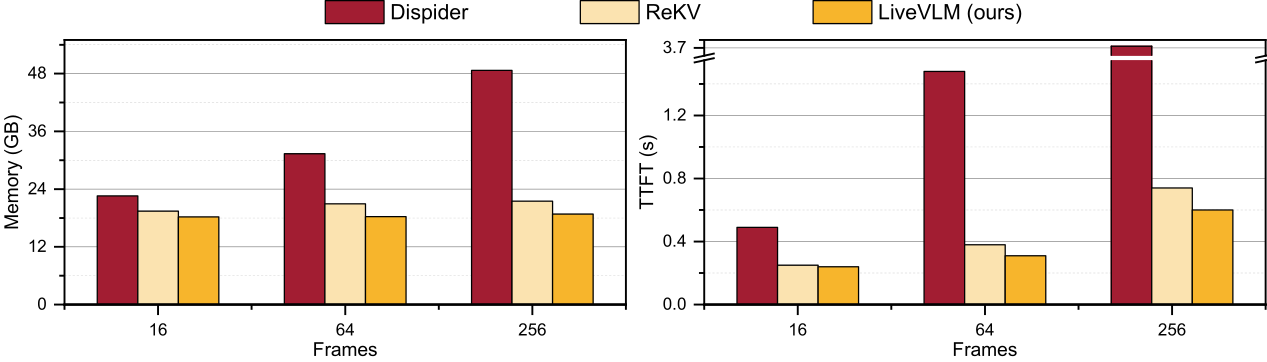
Figure 4 解读:左图为显存占用对比,右图为 Time-to-First-Token (TTFT) 对比。在 256 帧时:Dispider 显存约 48 GB(OOM),ReKV 约 36 GB;LiveVLM 仅约 12 GB。TTFT 方面:Dispider 在 256 帧时超过 1.2 秒,ReKV 约 0.8 秒(因 offload 到 CPU),LiveVLM 保持约 0.2 秒。LiveVLM 实现 2.6x 显存降低 和 5x 延迟加速。
5.3 离线长视频理解
| Model | Frames | EgoSchema | MLVU-dev | VideoMME Medium | VideoMME Long | VideoMME All |
|---|---|---|---|---|---|---|
| LLaVA-OneVision-7B | 32 | 58.5 | 64.7 | 54.7 | 46.2 | - |
| VideoXL-7B | 128 | - | 64.9 | 53.2 | 49.2 | 55.5 |
| MovieChat-7B | 2048 | 53.5 | 25.8 | - | 33.4 | 38.2 |
| Dispider-7B | 1 fps | 55.6 | 61.7 | 53.7 | 49.7 | 56.5 |
| LiveVLM | 0.5/0.2 fps | 59.0 (+0.5) | 66.3 (+1.6) | 56.4 (+1.7) | 48.8 (+2.6) | 57.3 (+0.4) |
关键发现:LiveVLM 在 长视频 上优势最明显 — VideoMME Long 提升 +2.6%,MLVU-dev 提升 +1.6%。
5.4 消融实验
检索 chunks 数量
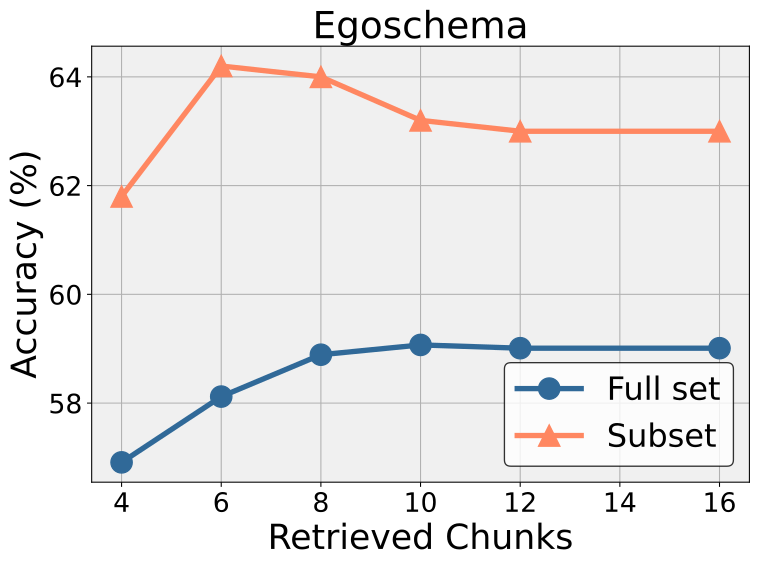
Figure 5a 解读:EgoSchema 上检索 chunks 数量与准确率的关系。Full set 和 Subset 两条曲线都在约 8-12 个 chunks 时达到峰值,之后缓慢下降,说明过多 chunks 引入噪声。
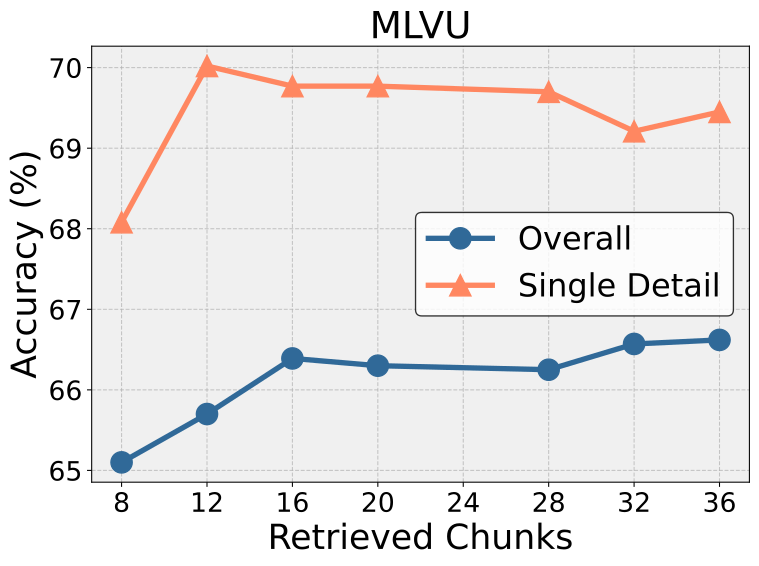
Figure 5b 解读:MLVU 上的消融。Overall 和 Single Detail 两条曲线走势不同:Overall 在约 20 chunks 时最优,Single Detail 在 16 左右达峰后略降。
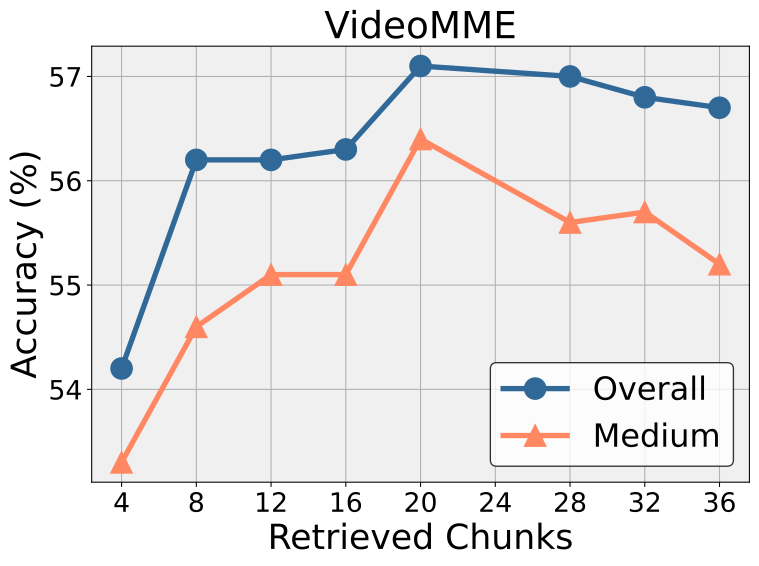
Figure 5c 解读:VideoMME 上的消融。Overall 和 Medium 曲线在 20 chunks 附近表现最佳,验证了默认 的合理性。
KV 压缩比消融(MLVU)
| 方法 | Frames | Tokens | Holistic (TR/AR) | Single Detail (NQA/ER/PQA) | Multi Detail (AO/AC) | All |
|---|---|---|---|---|---|---|
| LiveVLM (↓30%) | 0.5 fps | ~138 | 88.6 / 74.0 | 70.7 / 65.7 / 71.1 | 46.7 / 34.0 | 66.1 |
| LiveVLM (↓70%) | 0.5 fps | ~60 | 87.8 / 74.0 | 71.3 / 65.4 / 71.6 | 46.3 / 35.4 | 66.3 |
| LiveVLM (↓90%) | 0.5 fps | ~21 | 87.5 / 72.0 | 67.9 / 63.4 / 67.5 | 44.8 / 32.5 | 63.7 |
关键发现:压缩比从 30% 提升到 90%,性能仅下降 2.4 个百分点(66.1 → 63.7),证实视觉 token 表示存在 内在稀疏性。70% 压缩比在性能与效率间取得最佳平衡。
源码对应关系
| 论文组件 | 功能描述 | 对应代码 |
|---|---|---|
| Streaming Video Encoding | 以 clip 为单位编码视频流,利用历史压缩 KV 计算注意力 | 暂无开源代码 |
| Attention-based Token Discarding | 用最后 个 query tokens 计算部分注意力分数,丢弃低分 KV | 暂无开源代码 |
| Frame-wise KV Merging | 每帧 KV 合并为单个 KV tuple,保留时序语义 | 暂无开源代码 |
| Long-term Memory (FIFO) | 压缩 KV chunks 的存储与管理,维护 mean-pooled key | 暂无开源代码 |
| KV Retrieval | mean-pooled query 与 mean-pooled key 点积计算相关性,top-k 检索 | 暂无开源代码 |
| Relative Positional Embedding | 选中 tokens 使用相对 RoPE 位置编码 | 暂无开源代码 |
注:截至 2026-03-12,本文暂未发现公开的官方代码仓库。